My name is Aikansh, and I am an intern with the Ops Engineering team at Fyle. For our website, we use the versatile webpack as our module bundler and the excellent jekyll as our site generator. In summary, what we do is compile our ES6 code into an ES5 bundle and place it in Jekyll’s main /assets directory. During development, we have Jekyll’s server watch for changes and reload the page every time it detects a change in our JavaScript code.
The Problem
As is always the case given the speed of development, our web pages, components and webpack config grew organically, and the speed of the pipeline was an after-thought. It was so often we had to wait 10 whole seconds for our build to apply simple changes like color:black; to color:blue; :/ But there came a tipping point. Eventually, we snapped and decided to get that build time way down.
tl;dr version
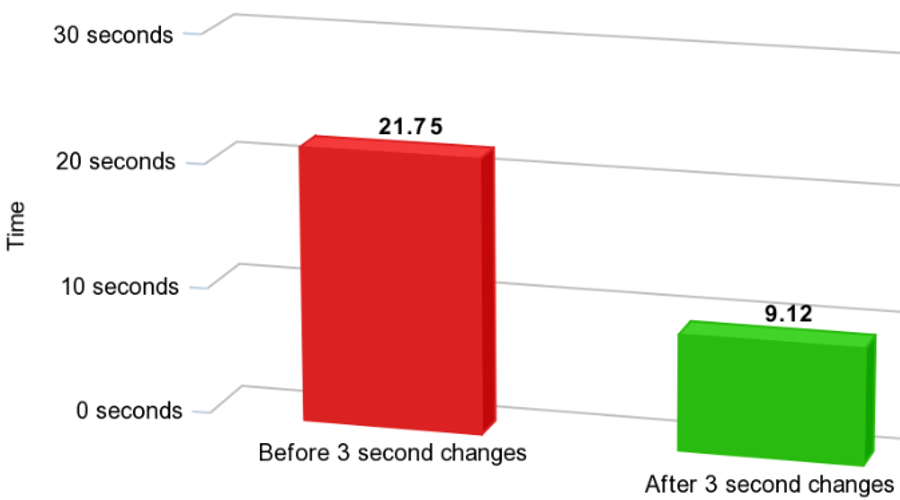
We reduced the build time by 59% with some minor tweaks. As a bonus, my teammates like me a lot, now.

The Approach
After being assigned this challenging yet interesting task, I started by measuring our performance. This really helps to find your current bottlenecks, and compare your progress as you make changes.
On running npm run dev, our script for getting the development server up running, we had to wait ~20-25s for webpack and jekyll to do their jobs.
Then, I noted down the basic points against which we could test our output later. We call these functional requirements: Production build should not be affected; don’t sacrifice the quality of application for small performance gains. npm script commands should remain unaltered. There should be noticeable differences in the resolving speed of the build & watch process.
Next up was research; following lots of articles, stackoverflow discussions, github issues threads and official documentations.
The Solution
Using some of their suggestions and experimenting with multiple configurations to accelerate the webpack and jekyll build performance, I came up with five 3 second changes to reduce the build time by over 59%. Sound good? Let’s get started.
-
Enable persistent caching with the webpack cache-loader:
The cache-loader allows to cache the result of following loaders on disk (default) or in the database. Cache-loaders can be placed in any chain of loaders and cache the results of previous loaders. By default, it stores the cache in the .cache-loader folder in the project root.
-
Replace Uglifyjs with Terser webpack plugin to minify your JavaScript:
Attached below is a snippet from npm trends. As we can see, Terser has gained significant popularity in the past one year. This can be directly attributed to its better performance compared to other minification tools. Uglify vs Terser: A mini battle royale

-
Use Shopify’s Liquid-C gem to speed up Liquid parsings:
Liquid is a secure templating language developed by Shopify. Liquid is designed for end-users to be able to execute logic within template files without imposing any security risk on the hosting server. Jekyll uses Liquid to generate the post content within the final page layout structure and as the primary interface for working with your site and post/page data. We took advantage of the Shopify liquid-c gem written in C to speed up this parsing. For this to work we simply needed to update our Gemfile.
-
Use Jekyll Include Cache plugin:
To see how Jekyll _includes affects site build times, I observed the build profile by running jekyll build —profile . Right away it was visible that some include files are being called hundreds of times, creating a performance bottleneck. Now was the right time to make use of jekyll-include-cache, a Jekyll plugin created by Ben Balter that will cache the rendering of our Liquid includes. “If you have a computationally expensive include (such as a sidebar or navigation), Jekyll Include Cache renders the include once, and then reuses the output any time that includes is called with the same arguments, potentially speeding up your site’s build significantly.” I started by caching the navigation in the header, footer, cookie consent banner, hello bar and the schedule demo form on our site. Reason; these components were being called on every page and don’t change that frequently.
-
Enable Jekyll Incremental flag in development:
Incremental regeneration helps shorten build times by only generating documents and pages that were updated since the previous build. It does this by keeping track of both file modification times and inter-document dependencies in the .jekyll-metadata file. This is how our script to run local setup looks like:
"dev": "webpack --mode development --devtool inline-source-map
        --watch & jekyll serve --livereload --incremental"
These are some of the hacks that helped us reduce our build time considerably. But webpack is a complex creature and optimisation is a dark art, I’m sure of having missed many tricks and we can keep getting better progressively. By the way, let me show you an actual picture of our website build now ;)

Happy Hacking!